Grammi Chef

For head chefs, event & retreat caterers

Plan the menu. Scale every recipe. Get the grocery list.

Don't forget anything for your next event. Get a complete and clear grocery list in no time.

14-day free trial · No card needed

[TODO] Illustration: a happy chef in the three situations — planning the event, shopping with the list, cooking the scaled recipes.

See a list being built

Three meals in, one grocery list out

Place the recipes, set the guests, and the list writes itself.

Animation: three meals of an event, each recipe scaled to its guests, and every ingredient added up into one grocery list sorted by supplier.

Features

Arrive at your event calm and organised

The whole event on one page

Set the days, the meals and the number of guests for each one, then drop your recipes where they belong. The event stops living in your notes, a few messages and your head — it's laid out in front of you. And when a day moves or a guest count changes, you change it once, not everywhere.
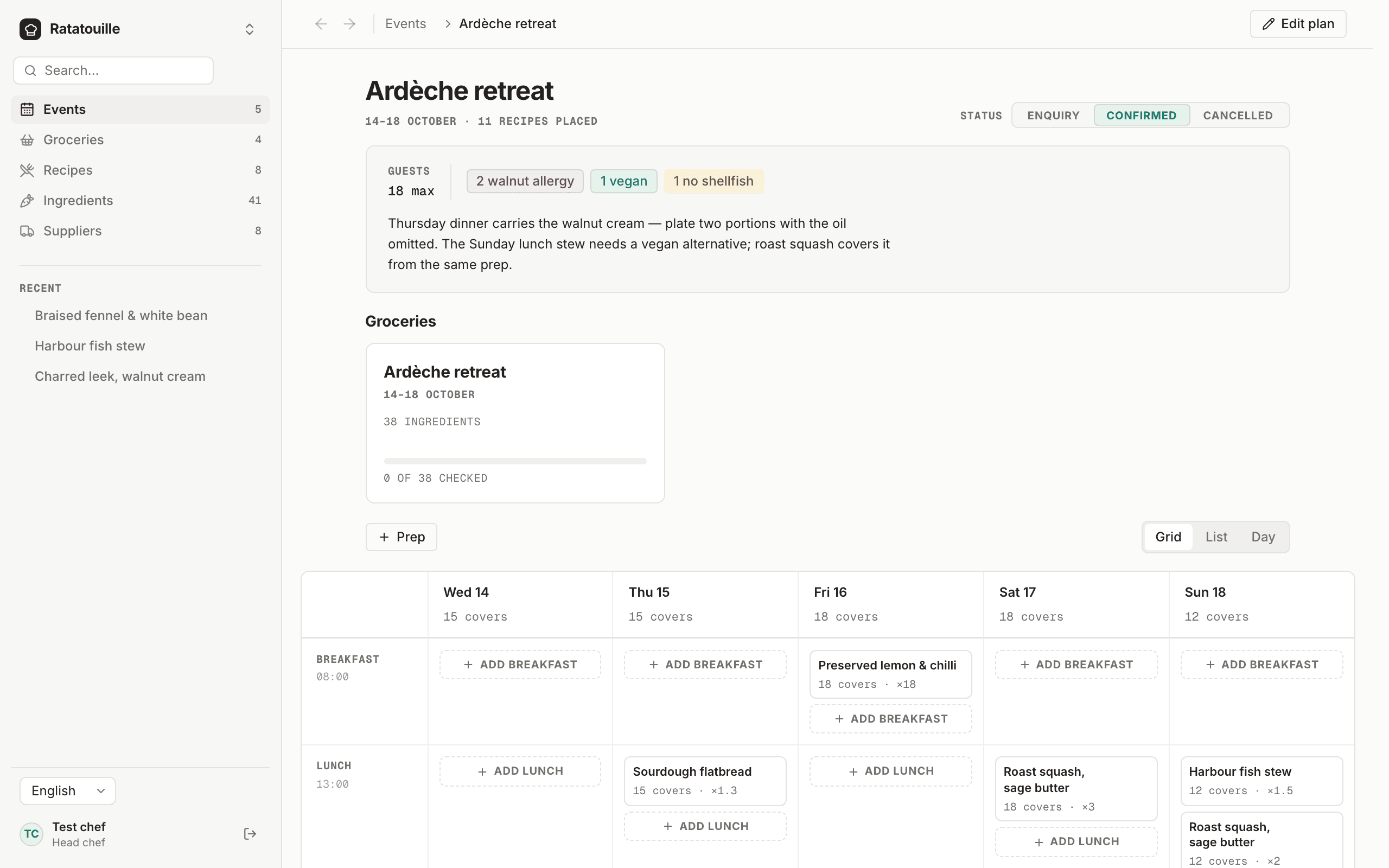
An event in Grammi Chef: its days and meals laid out as a grid, with the recipes and guest count of each

One list. Nothing left off it.

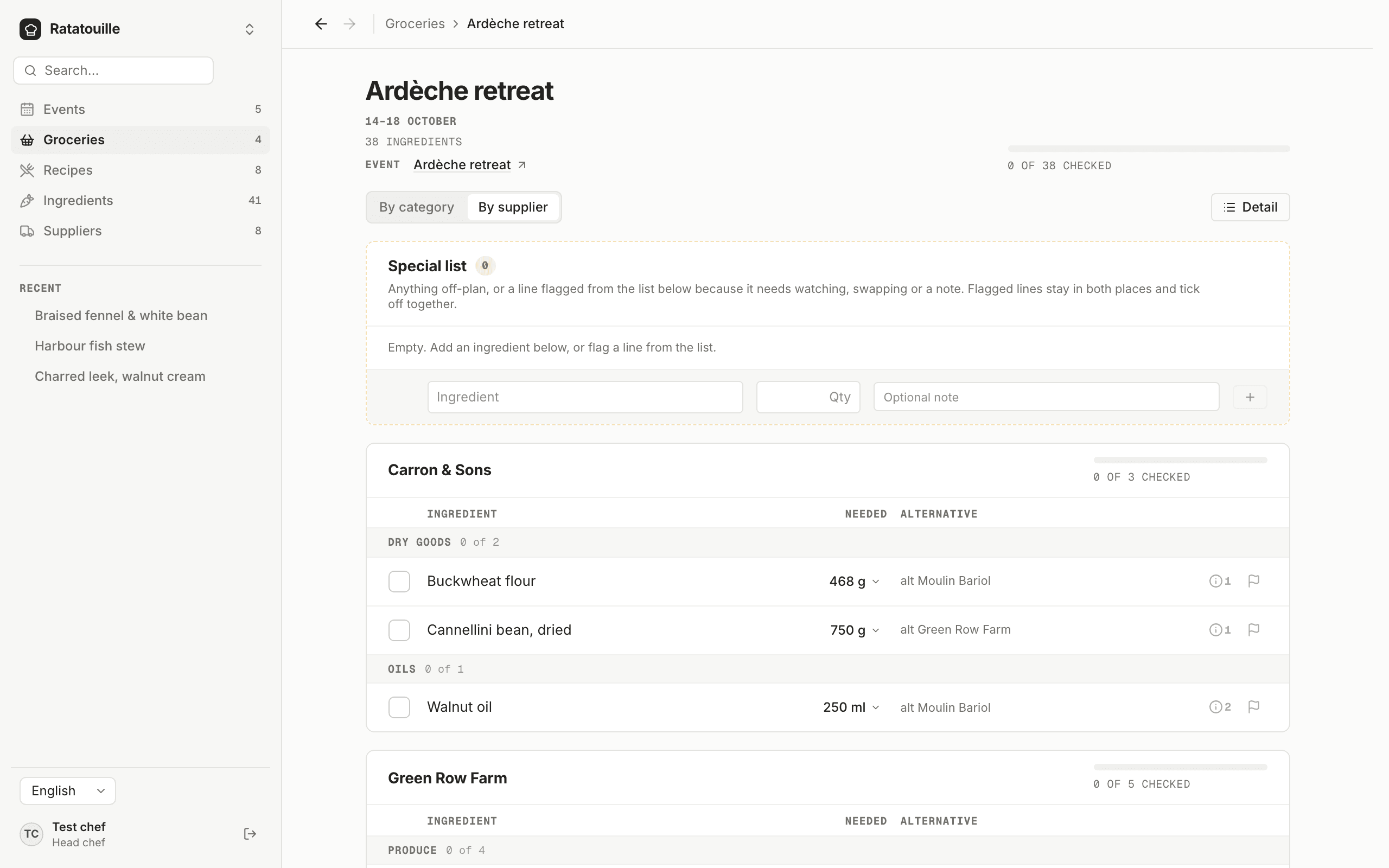
Every ingredient of every scaled recipe is added up across the whole event and grouped by supplier: the onions from twelve different meals become one line, with one number next to it. No adding up by hand at midnight, and no finding out at six in the evening — an hour from the nearest shop — that you're 2 kilos short.

A grocery list in Grammi Chef, grouped by supplier, each ingredient on one line with its total

The evening you get back

Scaling each recipe, adding up the quantities, guessing at the rest: the planning that used to take an evening takes about 20 minutes — and the numbers are exact instead of roughly right. When the guest count changes three days out, redoing it takes one.

20 mininstead of an evening

From the kitchen

Chefs who plan with Grammi Chef

[TODO] Béa's interview: a photo, a quote from it, and a link to the whole interview.

[TODO] A review: the quote, the chef's name and kitchen, and where it was posted.

[TODO] A review: the quote, the chef's name and kitchen, and where it was posted.

[TODO] A review: the quote, the chef's name and kitchen, and where it was posted.

FAQ

Before you start

Do I have to type in all my recipes before I can use it?
No. Start with the recipes for your next event — ten or fifteen — and you can have your first shopping list the same afternoon. The rest go in as you cook them. Type a recipe in, or paste it and let our AI read the amounts and units for you. It reads your recipe to structure it; it never learns from it.
My recipes are my work. Who else gets to see them?
Nobody. They're private to your account — no shared library, nothing published, no other user can reach them. We never sell them, share them, or use them to train AI models, ours or anyone else's.
I'm not very good with this kind of thing.
Nothing to install, nothing to set up. It opens in the browser on the phone in your pocket, and the first thing you do is type in a recipe — which you've done on paper a thousand times. And if you have any question, we're one message away: Contact us
My recipes aren't really written down — they're in my head.
Then write the next one down as you cook it. Quantities for the number of people you normally make it for, nothing more; the scaling is our job from there. A couple of services and you'll have the ten you cook most.
I only work half the year. Am I paying for months I don't cook?
You can pay yearly or monthly. Stop when the season ends, start again when it begins, and your recipes are exactly where you left them. If you'd rather pay less and keep it open all year, there's the yearly price.
What happens after the 14 days?
Nothing, unless you decide to carry on. We don't ask for a card to start, so there's nothing to charge and nothing to cancel.

Contact

Talk to us

A question about Grammi Chef, your data, or a plan for your team? Send us a message; a person reads every one and answers within two working days.